
This Blue Team challenge was published on April 20, 2023, on CyberDefenders.org. You can access the challenge at https://cyberdefenders.org/blueteam-ctf-challenges/101#nav-overview. Shoutout to Tyler Hudak for creating the challenge. I completed the challenge on the same day it was published. I got so hooked that I didn’t want to stop until I completed it. 
I rated the challenge to be between Medium – Hard in difficulty. The tools I used were Autopsy, and Notepad++.
The scenario is a Linux honeypot was placed online in Azure and attackers exploited the machine using CVE-2021-41773 vulnerability.
- There is a script that runs every minute to do cleanup. What is the name of the file?
- .r*****.**
- The hint in this question is “script that runs every minute.” This tells us that the script runs on schedule and can be found in cron jobs or scheduled tasks.
- In Autopsy, go to: vol6 > var > spool > cron > crontabs > root

- The script in the Q#1 terminates processes associated with two Bitcoin miner malware files. What is the name of the 1st malware file?
- k******
- The script we found in Q#1 tells us where the location of the file, and it is in the /root folder
- Go to vol6 > root > .r*****.**

- The script in Q#1 changes the permissions for some files. What is their new permission?
- 4**
- We can use the same steps we took in Q#2

- What is the sha256 hash of the botnet agent file?
- 0****************************************************************
- Agent files or unexpected files are stored inside the /var directory in Linux and typically in another folder called /tmp
- Go to vol6 > var > tmp > dk86 and extract the file by right-clicking and choose extract file

- Open powershell in the location where you extracted the file and run: get-filehash -algorithm sha256 dk86

- What is the name of the botnet in Q#4?
- T******
- Use the hash you generated from Q#4 and search for it in VirusTotal

- What IP address matches the creation timestamp of the botnet agent file in Q#4?
- 1**.***.**.**
- First, let us look at the created time of the file in Q#4. Look back at the steps we took in Q#4 if needed

- The agent file was most likely downloaded from the internet, so looking at the Apache access log makes sense. Go to vol6 > var > log > apache > access_log then extract the file

- Open the access_log file using Notepad++, then search for the matching timestamp

- What URL did the attacker use to download the botnet agent?
- h***://***.***.***.***:**/**-*******/******/*************/****
- We know that the name of the botnet agent file is dk86. We can search the access_log for an entry with the agent filename, but you will not find any
- Another Apache log that we saw in Q#6 was error_log. Let’s try and extract the file and search within for the filename

- What is the name of the file that the attacker downloaded to execute the malicious script and subsequently remove itself?
- .i******
- This one took a long time for me to find. I have no clue what file I was looking for, but the word “downloaded” at least tells me that the attacker would have used wget to download the file like what we saw in Q#7.
- Since the botnet agent filename was found in the error_log, I am guessing that will be a good place to search for other file downloads. I used the option find all in current document so I don’t have to keep hitting the Return key to jump to the next find
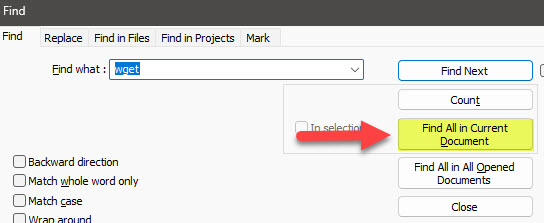
- I didn’t find the file using wget as filter, so another one that we can try is curl
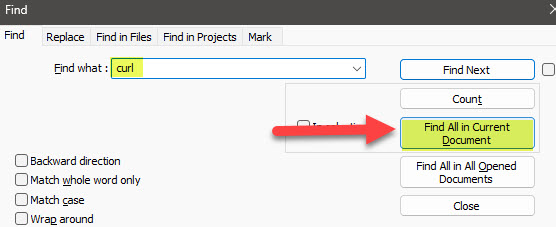
- Below is an interesting find. Looks like a base64 encoded string

- Let’s put the entries together in CyberChef to decode them

- The attacker downloaded sh scripts. What are the names of these files?
- 0_****.**, 0_*****.**, a*.**
- Since the question is asking for specific sh scripts, we can search the logs for .sh files

- We can now just manually search from the list of files with .sh extensions

- Two suspicious processes were running from a deleted directory. What are their PIDs.
- 6***, 2****
- This is the first time I’ve investigated using UAC. It is actually quite useful and powerful
- Go to the live_response folder to access the files we will need to investigate: C:\Users\Your_UserName\Downloads\c81-hudaks-honeypot\uac\uac\uac-ApacheWebServer-linux-20211208202503.tar\uac-ApacheWebServer-linux-20211208202503\live_response\process\lsof_-nPl.txt

- Open the file using Notepad++, and start looking for suspicious processes. What I noticed being suspicious were process names that contained the word deleted.


- What is the suspicious command line associated with the 2nd PID in Q#10?
- s* .***.**
- Take note of the 2nd PID and open the ps_-ef.txt file in the same location as Q#10

- UAC gathered some data from the second process in Q#10. What is the remote IP address and remote port that was used in the attack?
- 1***.***.***.**:*****
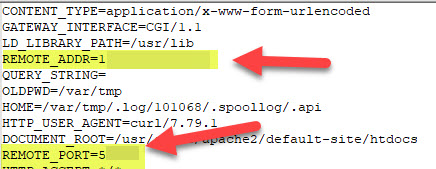
- This time we are going deeper into the folders to see details for each process. Again, remember the PID of the second process in Q#10. Go to C:\Users\Your_UserName\Downloads\c81-hudaks-honeypot\uac\uac\uac-ApacheWebServer-linux-20211208202503.tar\uac-ApacheWebServer-linux-20211208202503\live_response\process\proc\2****\environ.txt
- Look for the values of REMOTE_ADDR and REMOTE_PORT
- Which user was responsible for executing the command in Q#11.
- d*****
- Look at the steps we took in Q#11

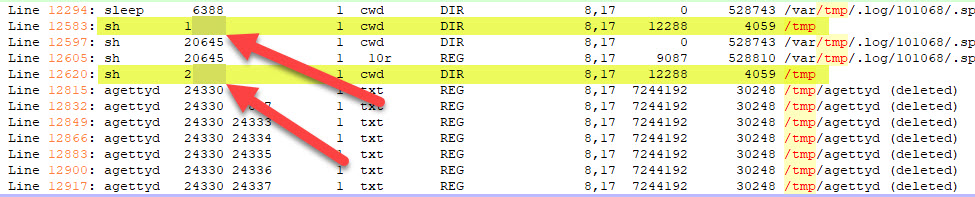
- Two suspicious shell processes were running from the /tmp folder. What are their PIDs?
- 1****, 2****
- Use the same path in Q#10, and this time filter the content with /tmp folder since the question is asking us for processes from the /tmp folder
- You will see from the results that there are only two processes that are in /tmp folder
- What is the MAC address of the captured memory?
- 00:**:**:**:**:**
- For this question we should be using volatility and do some memory forensics, but I was feeling lazy to spun up and run volatility, so I thought of probably just looking in the UAC files.
- I went to C:\Users\Your_UserName\Downloads\c81-hudaks-honeypot\uac\uac\uac-ApacheWebServer-linux-20211208202503.tar\uac-ApacheWebServer-linux-20211208202503\live_response\hardware\lshw.txt
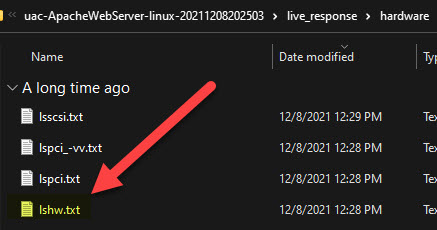
- Opened the file using Notepad++, scrolled down to the network information and found the MAC address

- From Bash history, the attacker downloaded an sh script. What is the name of the file?
- u**.**
- Same as Q#15, we should be doing memory forensics, but I returned to Autopsy and extracted the bash history file. Go to: vol 6 > home > azureuser >.bash_history

- Search for a downloaded .sh script

I hope you enjoyed my post and that you always find these things helpful.
Please subscribe to my blog if you haven’t done so. Thank you!


 N00b_H@ck3r
Two posts in a week?! What did I do to deserve this? Great write up. I did the Autopsy training long ago but it’s still Greek to me. 😂
Thanks again!
LikeLiked by 1 person
Thank you for always reading my blog posts. You are single-handedly keeping this blog alive. haha
LikeLike
Nice job!!! This was a great writeup! Can’t wait to read about others you do!
LikeLiked by 1 person
Oh my gosh!!! Tyler Hudak just commented on my blog!!!!!! I am a big follower of TrustedSec. I always read your blogs on your website. Your blog regarding Log4J Detection and Response was really helpful. I also follow Dave (@hackingdave) on Twitter and his “We hack health.”
LikeLiked by 1 person
😀 Thanks for the compliment…I’m reading through your other posts and am enjoying them!
LikeLiked by 1 person